Is Cloudeval a Lucidchart alternative for cloud diagrams?
Choose Cloudeval over Lucidchart when your goal is Azure architecture review from project context with diagrams, reports, AI Q&A, CLI exports, and MCP-compatible agent access. Choose Lucidchart when your goal is broad collaborative diagramming, templates, manual editing, stakeholder visuals, and Lucid ecosystem workflows.
Consider Cloudeval for
When current project context and engineering answers matter.
Consider Lucidchart + Lucidscale for
When a polished collaborative canvas is the main workspace.
Choose Cloudeval when you need to know whether an Azure change is safe to ship before deployment: it reviews ARM JSON, Bicep compiled to ARM JSON or live Azure, with findings from 1,650+ attributed checks, in the web app, CLI, GitHub Action or MCP.
Choose Lucidchart when the job is collaborative visual editing of general diagrams.
Use both when Lucidchart is the shared drawing space and Cloudeval reviews the Azure change.
Last reviewed: 2026-10-19
Where Cloudeval is a strong fit
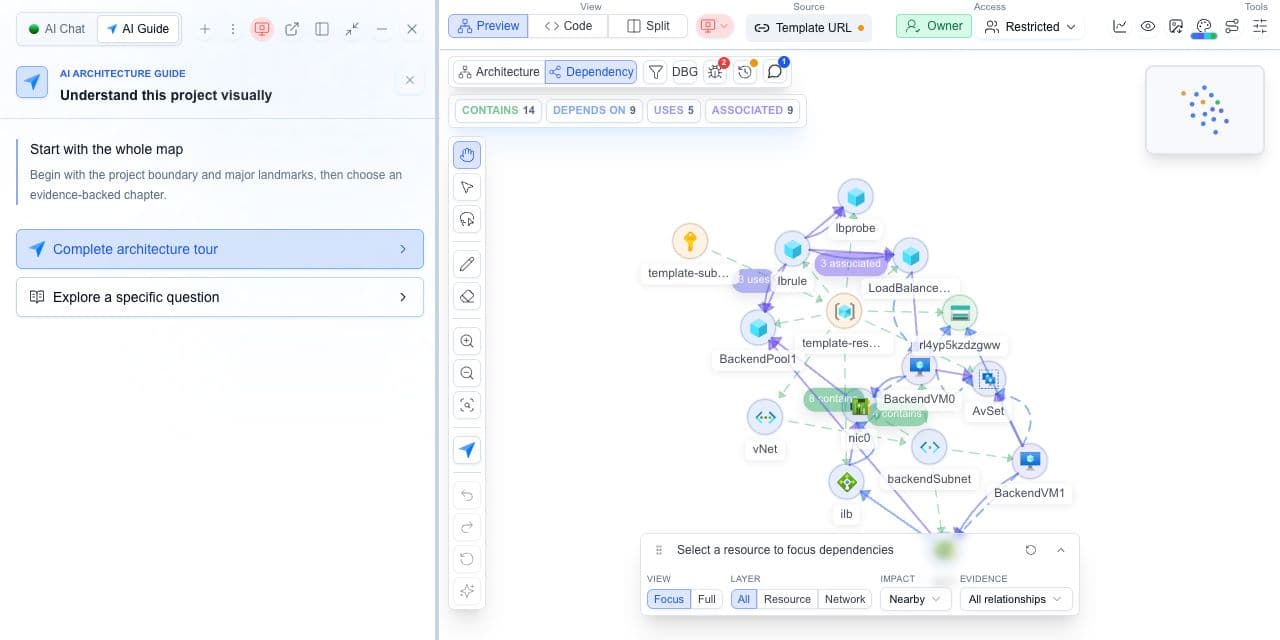
Understand the architecture and its dependencies
Explore architecture and dependency views, then inspect a resource and its properties.
Cloudeval’s comparison of documented workflows. Strong fit means a match for the named task, not a measured superiority claim. Verify exact coverage and plan requirements using the sources below.
Strong fitStrong fitVerify fitVerify for your workflowNot a fitWeak fit
Architecture and resource relationships
Cloudeval
Strong fitGenerate architecture and dependency views from supported project inputs; select resources to inspect properties and relationships.
Lucidchart + Lucidscale
Verify fitProvides collaborative diagramming, templates, data and AI-assisted diagram creation. Validate any cloud-discovery requirement separately.
Template review before deployment
Cloudeval
Strong fitImport ARM JSON, compiled Bicep or supported CloudFormation beta templates. Inspect represented resources before deployment.
Lucidchart + Lucidscale
Verify fitCompare the template input you need with the documented diagram/import workflow; do not assume IaC assessment parity.
Findings and source evidence
Cloudeval
Strong fitInvestigate supported findings alongside affected resources, source context and available rule evidence. Check actual assessment coverage.
Lucidchart + Lucidscale
Verify fitCan communicate review findings; verify the cloud assessment and source-evidence workflow you require.
Project-aware AI investigation
Cloudeval
Strong fitAsk about selected resources, dependencies and available report findings; inspect supporting references where present.
Lucidchart + Lucidscale
Verify fitLucid AI assists diagram work; confirm cloud-report grounding and access to the source evidence you need.
CLI, APIs and AI-agent access
Cloudeval
Strong fitUse supported CLI project/report workflows and MCP tools for project, graph, report and chat context.
Lucidchart + Lucidscale
Strong fitLucid offers MCP-based document discovery, diagram creation and editing. Compare those tools with Cloudeval project/report access.
Review exports and handoff
Cloudeval
Strong fitExport diagrams as PNG/JPEG/SVG and available reports as PDF/Markdown/JSON. Preserve source revision and assessment time.
Lucidchart + Lucidscale
Strong fitExports images and PDF, shape-data CSV, JSON and Visio formats; some formats require a paid plan.
Provider and input scope
Cloudeval
Verify fitAzure sync and ARM-derived projects; CloudFormationstatic review is beta. These do not imply live AWS or GCP parity.
Lucidchart + Lucidscale
Strong fitGeneral-purpose diagramming across domains; validate cloud discovery separately from templates and shape libraries.
Primary buying decision
Cloudeval
Strong fitStrong fit when diagrams, findings, source context and AI questions need to support the same architecture review.
Lucidchart + Lucidscale
Strong fitCollaborative visual editing and general-purpose business and technical diagrams are key strengths.
Criteria
Cloudeval
Lucidchart + Lucidscale
Architecture and resource relationships
Strong fitGenerate architecture and dependency views from supported project inputs; select resources to inspect properties and relationships.
Verify fitProvides collaborative diagramming, templates, data and AI-assisted diagram creation. Validate any cloud-discovery requirement separately.
Template review before deployment
Strong fitImport ARM JSON, compiled Bicep or supported CloudFormation beta templates. Inspect represented resources before deployment.
Verify fitCompare the template input you need with the documented diagram/import workflow; do not assume IaC assessment parity.
Findings and source evidence
Strong fitInvestigate supported findings alongside affected resources, source context and available rule evidence. Check actual assessment coverage.
Verify fitCan communicate review findings; verify the cloud assessment and source-evidence workflow you require.
Project-aware AI investigation
Strong fitAsk about selected resources, dependencies and available report findings; inspect supporting references where present.
Verify fitLucid AI assists diagram work; confirm cloud-report grounding and access to the source evidence you need.
CLI, APIs and AI-agent access
Strong fitUse supported CLI project/report workflows and MCP tools for project, graph, report and chat context.
Strong fitLucid offers MCP-based document discovery, diagram creation and editing. Compare those tools with Cloudeval project/report access.
Review exports and handoff
Strong fitExport diagrams as PNG/JPEG/SVG and available reports as PDF/Markdown/JSON. Preserve source revision and assessment time.
Strong fitExports images and PDF, shape-data CSV, JSON and Visio formats; some formats require a paid plan.
Provider and input scope
Verify fitAzure sync and ARM-derived projects; CloudFormationstatic review is beta. These do not imply live AWS or GCP parity.
Strong fitGeneral-purpose diagramming across domains; validate cloud discovery separately from templates and shape libraries.
Primary buying decision
Strong fitStrong fit when diagrams, findings, source context and AI questions need to support the same architecture review.
Strong fitCollaborative visual editing and general-purpose business and technical diagrams are key strengths.
Choose Cloudeval for cloud findings and project-aware AI investigation. Choose Lucidchart for collaborative visual editing and general-purpose diagrams; both offer MCP access.
Try the workflow with one environment
1.
Pick one cloud diagram your stakeholders already use.
2.
Create the Cloudeval Azure project behind that diagram.
3.
Run a report and ask one question that requires architecture context.
4.
Export the result and decide whether Lucidchart polish is still needed.
AI Guide
Test the review path, not only the diagram
Use AI Guide on the same representative project you use for this comparison. It frames the relevant resources, keeps architecture and dependency context visible, and connects each chapter to evidence and a next check.
Personas adjust the emphasis for executive, architecture, security, or operations reviews. They do not change the available project evidence.
Not for broad collaborative diagramming. Cloudeval is better to test when the diagram needs Azure project context, reports, AI questions, CLI exports, and MCP-compatible agent access.
Keep Lucidchart when the workflow depends on manual diagram editing, workshop visuals, broad templates, and stakeholder collaboration across many diagram types.
Yes. Use Cloudeval for Azure review and generated outputs, then use Lucidchart if the final stakeholder diagram needs custom visual editing.
 Cloudeval