Answers
How do I export a cloud review with its evidence?
Cloudeval lets you share a review with its available evidence and resource detail. Open the report, select Export, choose PDF, Markdown or JSON, and select Evaluation pack. Keep the source revision and assessment timestamp with the file so reviewers can understand the scope behind the findings.
Where Cloudeval is a strong fit
Understand the architecture and its dependencies
Explore architecture and dependency views, then inspect a resource and its properties.
Explore the diagram workflowConnect a finding to the resource and evidence
Investigate supported findings alongside source context, resource details and coverage.
Investigate a findingAsk AI questions with project context
Ask about resources and report findings using the context already in your project.
Understand an inherited Azure environmentCarry the review into your team's workflow
Use CLI/MCP workflows and export diagrams or available report evidence for your team.
Explore review exportsTurn a diagram into a guided investigation
When a written answer is not enough, AI Guide walks through the architecture or dependency view, highlights the resources under discussion, and keeps the explanation, evidence, and next check together.
Personas adjust the emphasis for executive, architecture, security, or operations reviews. They do not change the available project evidence.
See how AI Guide works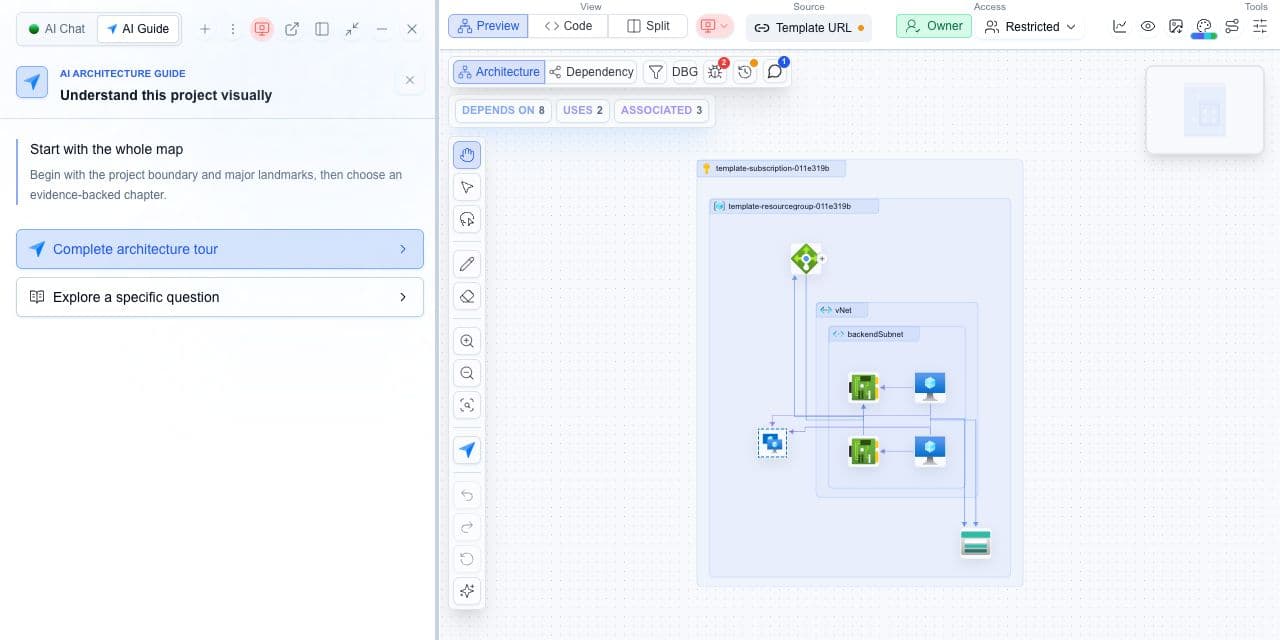
What you need
- Access to the report you want to share.
- The intended audience and source revision for the review.
What you get
- A PDF, Markdown or JSON report at the selected depth.
- A handoff that separates export time from assessment time.
Prepare a review someone else can verify
- Choose the project, report filters and time range for the review.
- Check warnings, assumptions and assessment freshness in Evidence & Progress.
- Open Export and select PDF report, Markdown report or JSON report.
- Choose Executive brief, Detailed evaluation or Evaluation pack for the intended audience.
- Open the downloaded file and verify resource identity, coverage, units and source context before sharing it.
A file timestamp is not a fresh assessment
Generating an export creates a new file; it does not collect cloud state or rerun scanners. Keep the original assessment time and source revision alongside the report. Retain the actual CI result when the decision concerns a pull request.
Cloudeval report exports contain the available report model. They are not a complete raw scanner archive or a project backup, and cannot supply evidence that was never collected.
Copy evidence pack in the section handoff menu creates bounded AI context. It is different from Export → JSON report and may contain references rather than embedded artifact files.
