How do I understand an Azure environment I inherited?
Quick answer
To understand an inherited Azure environment, start with the subscription and resource-group scope, map the resources and dependencies, then investigate one risk at a time.
Azure Resource Graph and portal tools help inventory live resources; Cloudeval adds diagrams, reports, source-linked findings and project-aware questions for an imported ARM JSON template or documented Azure sync.
Start here
Use this to
Build a trustworthy inventory of an inherited Azure environment, trace one dependency, and record what the available evidence does and does not establish.
Best source to use
A missing relationship may mean missing source or stale sync. Check the last sync and the imported scope before assuming two services are disconnected.
What you need
- A Cloudeval project with imported or synced Azure context.
- At least one diagram, report, or resource graph to ground the answer.
- A specific question, not a broad prompt.
What you get
- An answer tied to project context.
- Evidence, citations, or report references where available.
- A next step when evidence is missing.
Get started
- 1Connect Azure with the documented permissions, or import ARM JSON for a source-only review.
- 2Start with resource groups and service boundaries in Architecture view.
- 3Select one resource in Dependency view and trace its relationships.
- 4Ask which source properties or report findings support the explanation.
- 5Check sync time and missing evidence before sharing the result.
- 6Start with one resource and one question, then open the referenced source or report before making a change.
- 7Compare the observation time, imported scope and report status when an answer seems incomplete.
- 8Export the relevant diagram or report section with its source revision when handing the review to another engineer.
- 9Record subscriptions, resource groups, regions and the last sync or source revision before drawing conclusions.
- 10Use Azure Resource Graph for live inventory queries, then use the Cloudeval graph and reports to investigate architecture and findings together.
- 11Write down missing permissions, unsupported relationships and stale source areas as follow-up work rather than treating them as empty results.
When this works best
A graph describes collected relationships, not observed network traffic.
- ARM import does not require live Azure credentials; live discovery does.
- Neither proves runtime reachability.
Turn a diagram into a guided investigation
When a written answer is not enough, AI Guide walks through the architecture or dependency view, highlights the resources under discussion, and keeps the explanation, evidence, and next check together.
Personas adjust the emphasis for executive, architecture, security, or operations reviews. They do not change the available project evidence.
See how AI Guide works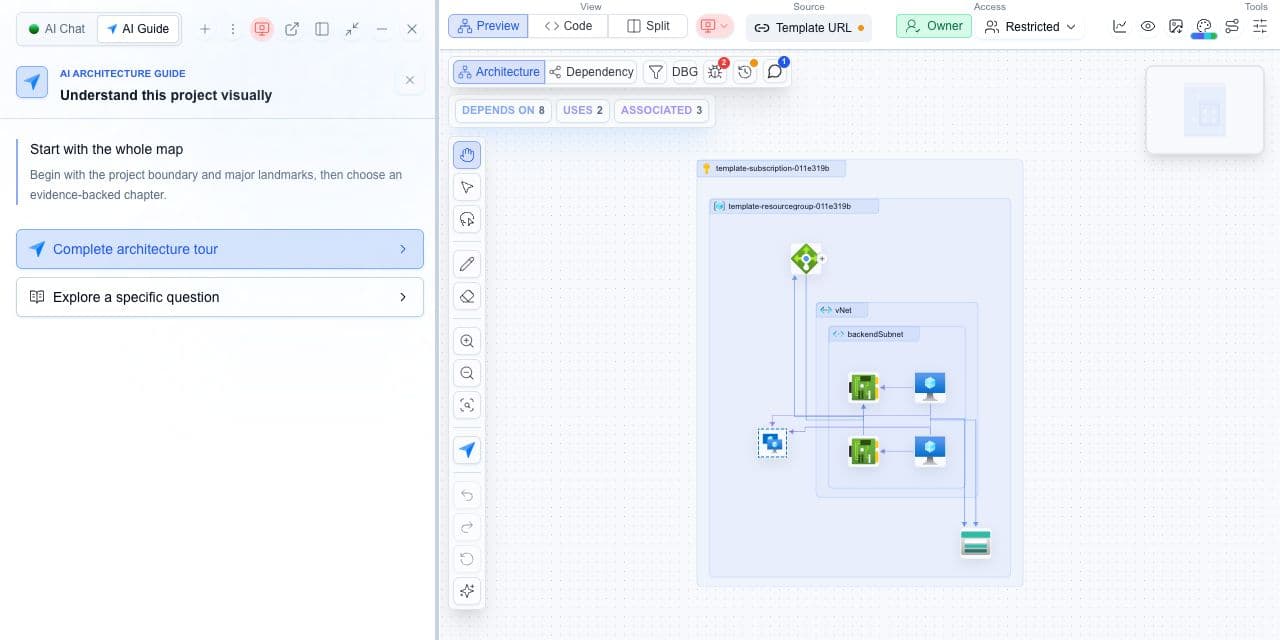
Decision guide
| Check | Cloudeval path | Note |
|---|---|---|
| Question style | Ask about one project, report, resource, or risk. | Specific questions produce clearer answers. |
| Grounding | Project graph, reports, docs, and evidence. | Cloudeval should say when evidence is missing. |
| Output | Answer plus next step. | Use reports for decisions that need source support. |
| Sharing | Export or share reviewed findings. | Do not expose private resource details unintentionally. |
Trace one application dependency
Start with a load balancer or application resource.
- Ask which resources it depends on, inspect those resources in the graph, and open the supporting source or report.
- If the question is whether traffic can actually pass, verify deployed networking separately.
Terminal and agent workflow
Use this command for one-shot project questions.
shellcloudeval ask "Summarize this project's top architecture risks" --project <project-id>- MCP-compatible agents can query Cloudeval context from supported clients.
- CLI sessions can preserve useful local history for automation and investigation workflows.
How to trust the result
- Ask which resource, report, or diagram element supports the answer when it affects a decision.
- Check sync time and report confidence before sharing recommendations.
- Use narrow questions for specific resources, findings, or dependencies.
