Cloudeval helps you investigate Azure architecture before deployment and during review: turn ARM templates or connected Azure context into diagrams, inspect source-linked findings, ask project-aware AI questions and export reports. Azure Advisor provides native recommendations for deployed Azure resources. Use Cloudeval when the decision needs source context, visual relationships and a shareable review alongside those recommendations.
Consider Cloudeval for
Cloudeval is strongest when a team needs diagrams, reports, evidence, GitHub/CLI workflows, and grounded AI answers around the same review decision.
Consider Azure Advisor for
Azure Advisor is strongest as a native Azure recommendation surface for resources inside Azure.
Choose Cloudeval when you need to know whether an Azure change is safe to ship before deployment: it reviews ARM JSON, Bicep compiled to ARM JSON or live Azure, with findings from 1,650+ attributed checks, in the web app, CLI, GitHub Action or MCP.
Choose Azure Advisor when you want recommendations on resources already deployed in Azure.
Use both when Advisor watches the live estate and Cloudeval reviews the template before it ships.
Last reviewed: 2026-10-19
Where Cloudeval is a strong fit
Understand the architecture and its dependencies
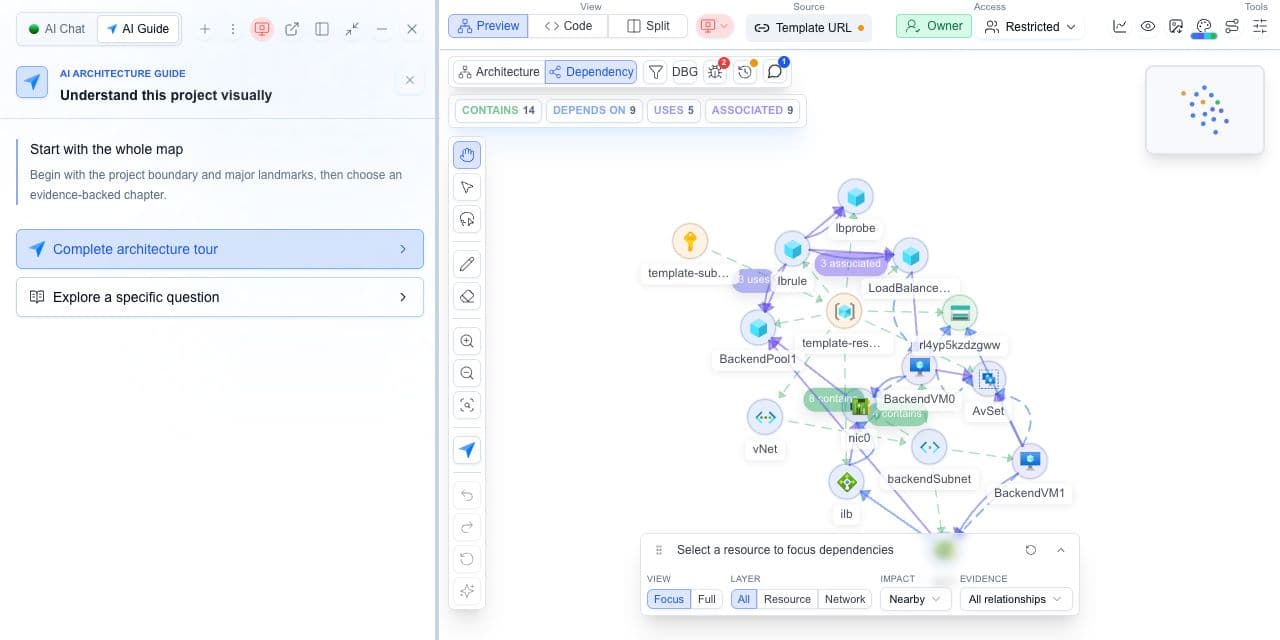
Explore architecture and dependency views, then inspect a resource and its properties.
Cloudeval’s comparison of documented workflows. Strong fit means a match for the named task, not a measured superiority claim. Verify exact coverage and plan requirements using the sources below.
Strong fitStrong fitVerify fitVerify for your workflowNot a fitWeak fit
Review inputs
Cloudeval
Strong fitGenerate diagrams and review supported findings from imported ARM templates or connected Azure context. Template imports can start before deployment.
Azure Advisor
Strong fitAnalyzes deployed resource configuration and usage telemetry.
Before deployment
Cloudeval
Strong fitInspect supported template resources, relationships and assessment findings before deployment.
Azure Advisor
Verify fitRecommendations focus on resources in Azure; use alongside a source review.
Recommendation coverage
Cloudeval
Verify fitCheck which assessment ran, its supported resources and missing evidence.
Azure Advisor
Strong fitCovers reliability, security, performance, cost and operational excellence.
Investigation and handoff
Cloudeval
Strong fitConnect diagrams, findings, source context and report exports in one review.
Azure Advisor
Strong fitFilter native recommendations and follow the suggested remediation actions.
Project-aware investigation
Cloudeval
Strong fitAsk questions using project, resource and available report context; inspect supporting references.
Azure Advisor
Strong fitInvestigate native recommendations and remediation guidance against deployed resource context.
Terminal and agent access
Cloudeval
Strong fitUse supported CLI report/project workflows and MCP tools for graph and report context.
Azure Advisor
Verify fitAdvisor provides a REST API; compare the specific agent integration you need.
Access and freshness
Cloudeval
Verify fitTemplate imports can start without live Azure access. Check source revision and report time.
Azure Advisor
Strong fitUses Azure role-based access; completed fixes can take time to appear.
Criteria
Cloudeval
Azure Advisor
Review inputs
Strong fitGenerate diagrams and review supported findings from imported ARM templates or connected Azure context. Template imports can start before deployment.
Strong fitAnalyzes deployed resource configuration and usage telemetry.
Before deployment
Strong fitInspect supported template resources, relationships and assessment findings before deployment.
Verify fitRecommendations focus on resources in Azure; use alongside a source review.
Recommendation coverage
Verify fitCheck which assessment ran, its supported resources and missing evidence.
Strong fitCovers reliability, security, performance, cost and operational excellence.
Investigation and handoff
Strong fitConnect diagrams, findings, source context and report exports in one review.
Strong fitFilter native recommendations and follow the suggested remediation actions.
Project-aware investigation
Strong fitAsk questions using project, resource and available report context; inspect supporting references.
Strong fitInvestigate native recommendations and remediation guidance against deployed resource context.
Terminal and agent access
Strong fitUse supported CLI report/project workflows and MCP tools for graph and report context.
Verify fitAdvisor provides a REST API; compare the specific agent integration you need.
Access and freshness
Verify fitTemplate imports can start without live Azure access. Check source revision and report time.
Strong fitUses Azure role-based access; completed fixes can take time to appear.
Use Cloudeval for template review, diagrams and source-linked findings. Use Azure Advisor for recommendations on deployed Azure resources. The workflows can complement one another.
Try the workflow with one environment
1.
List the workflow and provider coverage your team needs.
2.
Test one supported project in Cloudeval and inspect its coverage.
3.
Evaluate Azure Advisor against the same requirements.
4.
Compare the outputs, access requirements and current pricing before choosing.
AI Guide
Test the review path, not only the diagram
Use AI Guide on the same representative project you use for this comparison. It frames the relevant resources, keeps architecture and dependency context visible, and connects each chapter to evidence and a next check.
Personas adjust the emphasis for executive, architecture, security, or operations reviews. They do not change the available project evidence.
 Cloudeval
 Azure Advisor