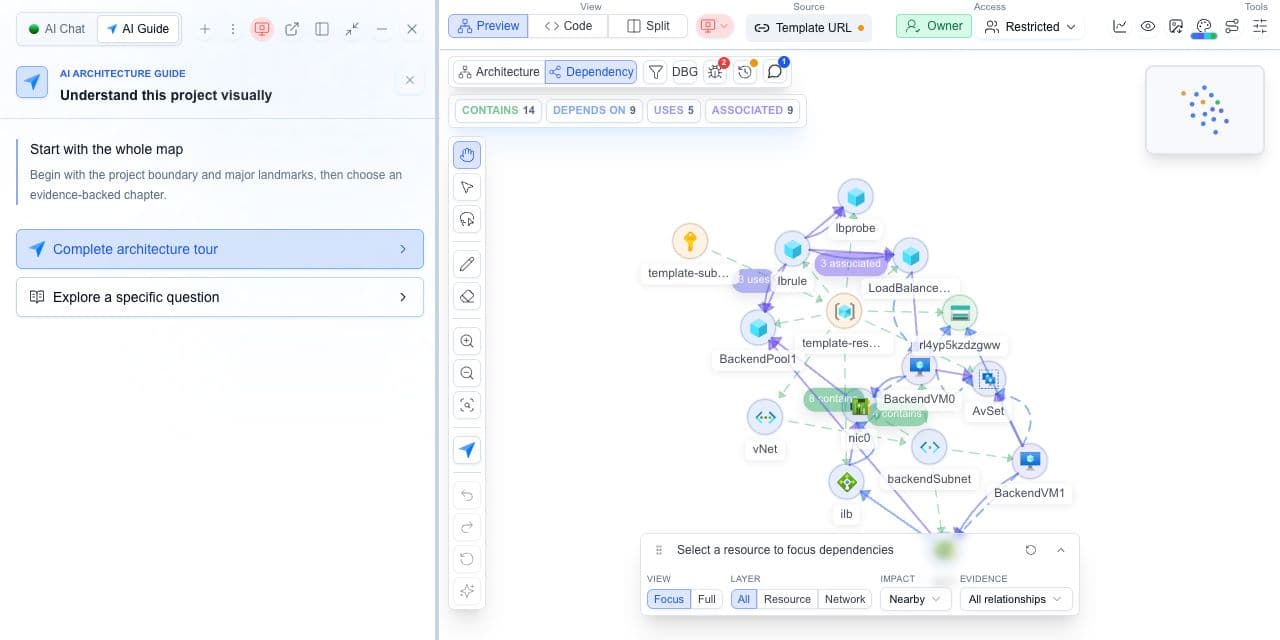
Cloudeval turns supported CloudFormation templates into a review you can investigate before deployment: inspect resource relationships, trace available static findings to their source and carry evidence into the architecture discussion. AWS Well-Architected Tool organizes the broader workload review through questions, lenses and milestones. The two can work together; template evidence does not establish live AWS state.
Consider Cloudeval for
Use Cloudeval to inspect supported CloudFormation templates, resource relationships and available static findings before deployment.
Consider AWS Well-Architected Tool for
Use the AWS tool when the workload and review process are centered on AWS-native Well-Architected workflows.
Choose Cloudeval when you need to know whether a change is safe to ship: it reviews AWS CloudFormation templates (static beta) before deployment, with no live AWS.
Choose the AWS Well-Architected Tool when you are reviewing a deployed AWS workload.
Use both when the Well-Architected Tool reviews the AWS workload and Cloudeval reviews the CloudFormation template.
Last reviewed: 2026-10-19
Where Cloudeval is a strong fit
Understand the template before deployment
Import supported JSON or YAML and explore the resources and relationships before deployment.
Cloudeval’s comparison of documented workflows. Strong fit means a match for the named task, not a measured superiority claim. Verify exact coverage and plan requirements using the sources below.
Strong fitStrong fitVerify fitVerify for your workflowNot a fitWeak fit
CloudFormation before deployment
Cloudeval
Strong fitImport a supported template and inspect resources, relationships and static findings.
AWS Well-Architected Tool
Verify fitDocument architectural decisions and answers; a workload review is a different input from a template scan.
Architecture and dependency diagrams
Cloudeval
Strong fitExplore the resources and relationships represented by a supported CloudFormation import.
AWS Well-Architected Tool
Verify fitOrganizes workload questions and decisions; use architecture artifacts to support the review.
Resource-level inspection
Cloudeval
Strong fitSelect an imported resource and inspect its properties and template context.
AWS Well-Architected Tool
Verify fitReview workload-level answers, risks and improvement recommendations.
Source-linked static findings
Cloudeval
Strong fitInvestigate available findings against resource IDs, rules and template source.
AWS Well-Architected Tool
Verify fitUse workload answers and supporting evidence to identify improvement areas.
Workload review
Cloudeval
Verify fitBring template findings and source context into the review; business and operational questions still need workload knowledge.
AWS Well-Architected Tool
Strong fitReview workloads against Well-Architected questions and lenses.
Progress over time
Cloudeval
Verify fitKeep source revisions and assessment timestamps with exported findings; compare equivalent scopes.
AWS Well-Architected Tool
Strong fitSave milestones to compare the workload at different points in its review.
Live AWS state
Cloudeval
Not a fitA CloudFormation import does not establish deployed state, traffic or runtime access.
AWS Well-Architected Tool
Verify fitWorkload answers and integrations support review; they still require accurate workload context.
Criteria
Cloudeval
AWS Well-Architected Tool
CloudFormation before deployment
Strong fitImport a supported template and inspect resources, relationships and static findings.
Verify fitDocument architectural decisions and answers; a workload review is a different input from a template scan.
Architecture and dependency diagrams
Strong fitExplore the resources and relationships represented by a supported CloudFormation import.
Verify fitOrganizes workload questions and decisions; use architecture artifacts to support the review.
Resource-level inspection
Strong fitSelect an imported resource and inspect its properties and template context.
Verify fitReview workload-level answers, risks and improvement recommendations.
Source-linked static findings
Strong fitInvestigate available findings against resource IDs, rules and template source.
Verify fitUse workload answers and supporting evidence to identify improvement areas.
Workload review
Verify fitBring template findings and source context into the review; business and operational questions still need workload knowledge.
Strong fitReview workloads against Well-Architected questions and lenses.
Progress over time
Verify fitKeep source revisions and assessment timestamps with exported findings; compare equivalent scopes.
Strong fitSave milestones to compare the workload at different points in its review.
Live AWS state
Not a fitA CloudFormation import does not establish deployed state, traffic or runtime access.
Verify fitWorkload answers and integrations support review; they still require accurate workload context.
Use Cloudeval to investigate CloudFormation templates before deployment. Use AWS Well-Architected for workload questions, lenses and milestones. Static reviewdoes not verify live AWS state.
Try the workflow with one environment
1.
List the workflow and provider coverage your team needs.
2.
Import one representative CloudFormation template into Cloudeval.
3.
Evaluate AWS Well-Architected Tool against the same requirements.
4.
Compare the outputs, access requirements and current pricing before choosing.
AI Guide
Test the review path, not only the diagram
Use AI Guide on the same representative project you use for this comparison. It frames the relevant resources, keeps architecture and dependency context visible, and connects each chapter to evidence and a next check.
Personas adjust the emphasis for executive, architecture, security, or operations reviews. They do not change the available project evidence.
No. Cloudeval can provide CloudFormation template evidence, but AWS Well-Architected Tool covers workload questions, lenses and review milestones.
Cloudeval makes supported template resources, relationships and static findings inspectable before deployment. That evidence can support the architectural decisions documented in an AWS Well-Architected workload review.
 Cloudeval
 AWS Well-Architected Tool