Is Cloudeval a draw.io alternative for cloud architecture diagrams?
Choose Cloudeval over draw.io when you want an Azure architecture diagram created from project context and connected to reports, AI Q&A, CLI exports, and MCP-compatible agent access. Choose draw.io when you need a flexible manual diagram editor, offline or browser-based editing, storage control, broad integrations, and free-form visual drafting.
Choose Cloudeval when you need to know whether an Azure change is safe to ship before deployment: it reviews ARM JSON, Bicep compiled to ARM JSON or live Azure, with findings from 1,650+ attributed checks, in the web app, CLI, GitHub Action or MCP.
Choose draw.io when you need a hand-drawn diagram you can edit freely.
Use both when draw.io holds the picture and Cloudeval reviews the Azure change before it ships.
Last reviewed: 2026-10-19
Where Cloudeval is a strong fit
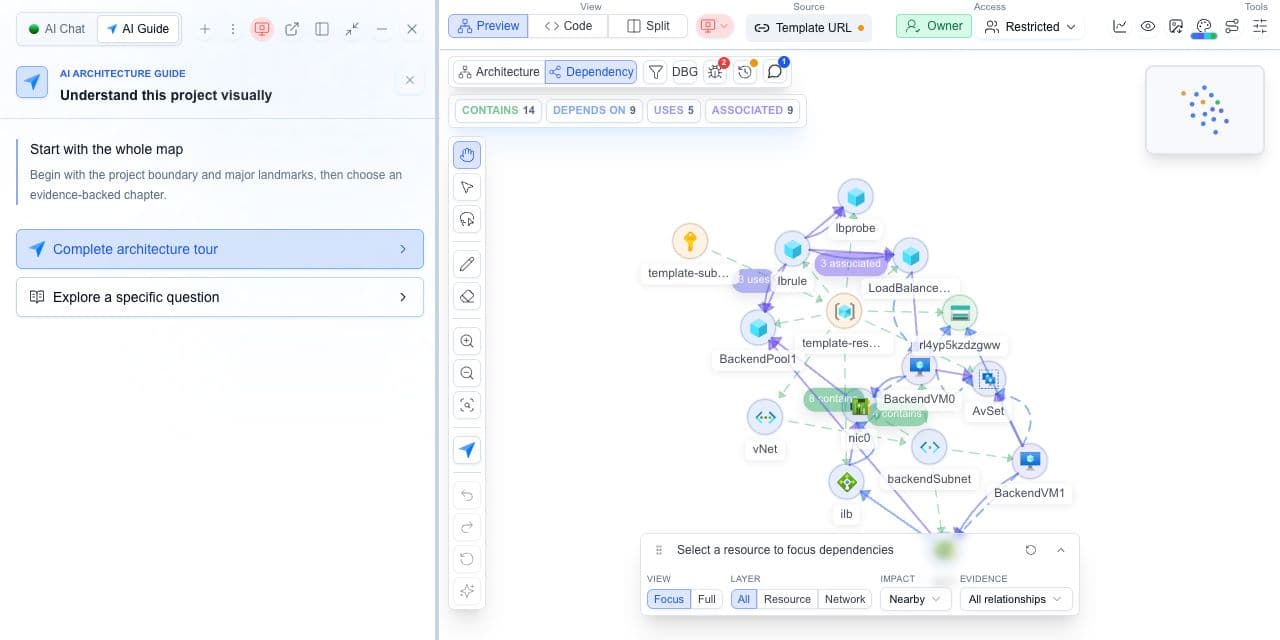
Understand the architecture and its dependencies
Explore architecture and dependency views, then inspect a resource and its properties.
Cloudeval’s comparison of documented workflows. Strong fit means a match for the named task, not a measured superiority claim. Verify exact coverage and plan requirements using the sources below.
Strong fitStrong fitVerify fitVerify for your workflowNot a fitWeak fit
Architecture and resource relationships
Cloudeval
Strong fitGenerate architecture and dependency views from supported project inputs; select resources to inspect properties and relationships.
draw.io
Verify fitSupports manual drawing, structured imports and AI-generated diagrams. Native cloud discovery is a separate requirement.
Template review before deployment
Cloudeval
Strong fitImport ARM JSON, compiled Bicep or supported CloudFormation beta templates. Inspect represented resources before deployment.
draw.io
Verify fitCompare the template input you need with the documented diagram/import workflow; do not assume IaC assessment parity.
Findings and source evidence
Cloudeval
Strong fitInvestigate supported findings alongside affected resources, source context and available rule evidence. Check actual assessment coverage.
draw.io
Verify fitCan illustrate findings supplied by a user or integration; diagram generation does not establish a cloud assessment.
Project-aware AI investigation
Cloudeval
Strong fitAsk about selected resources, dependencies and available report findings; inspect supporting references where present.
draw.io
Verify fitAI generation can create and edit diagrams; assessment evidence must come from a supplied source or integration.
CLI, APIs and AI-agent access
Cloudeval
Strong fitUse supported CLI project/report workflows and MCP tools for project, graph, report and chat context.
draw.io
Strong fitOffers an MCP server, coding-agent plugins and Desktop CLI exports; AI/CLI access is not exclusive to Cloudeval.
Review exports and handoff
Cloudeval
Strong fitExport diagrams as PNG/JPEG/SVG and available reports as PDF/Markdown/JSON. Preserve source revision and assessment time.
draw.io
Verify fitExports portable diagram files and images, with Desktop CLI support.
Provider and input scope
Cloudeval
Verify fitAzure sync and ARM-derived projects; CloudFormationstatic review is beta. These do not imply live AWS or GCP parity.
draw.io
Strong fitProvider-neutral drawing and imports. Cloud symbols or AI-generated diagrams are not live cloud discovery.
Primary buying decision
Cloudeval
Strong fitStrong fit when diagrams, findings, source context and AI questions need to support the same architecture review.
draw.io
Strong fitFlexible diagram editing, portable files and offline desktop drawing are key strengths.
Criteria
Cloudeval
draw.io
Architecture and resource relationships
Strong fitGenerate architecture and dependency views from supported project inputs; select resources to inspect properties and relationships.
Verify fitSupports manual drawing, structured imports and AI-generated diagrams. Native cloud discovery is a separate requirement.
Template review before deployment
Strong fitImport ARM JSON, compiled Bicep or supported CloudFormation beta templates. Inspect represented resources before deployment.
Verify fitCompare the template input you need with the documented diagram/import workflow; do not assume IaC assessment parity.
Findings and source evidence
Strong fitInvestigate supported findings alongside affected resources, source context and available rule evidence. Check actual assessment coverage.
Verify fitCan illustrate findings supplied by a user or integration; diagram generation does not establish a cloud assessment.
Project-aware AI investigation
Strong fitAsk about selected resources, dependencies and available report findings; inspect supporting references where present.
Verify fitAI generation can create and edit diagrams; assessment evidence must come from a supplied source or integration.
CLI, APIs and AI-agent access
Strong fitUse supported CLI project/report workflows and MCP tools for project, graph, report and chat context.
Strong fitOffers an MCP server, coding-agent plugins and Desktop CLI exports; AI/CLI access is not exclusive to Cloudeval.
Review exports and handoff
Strong fitExport diagrams as PNG/JPEG/SVG and available reports as PDF/Markdown/JSON. Preserve source revision and assessment time.
Verify fitExports portable diagram files and images, with Desktop CLI support.
Provider and input scope
Verify fitAzure sync and ARM-derived projects; CloudFormationstatic review is beta. These do not imply live AWS or GCP parity.
Strong fitProvider-neutral drawing and imports. Cloud symbols or AI-generated diagrams are not live cloud discovery.
Primary buying decision
Strong fitStrong fit when diagrams, findings, source context and AI questions need to support the same architecture review.
Strong fitFlexible diagram editing, portable files and offline desktop drawing are key strengths.
Choose Cloudeval for infrastructure review connected to source and report evidence. Choose draw.io for flexible diagram editing, portable files and offline drawing; both offer agent workflows.
Try the workflow with one environment
1.
Pick one stale manual cloud diagram.
2.
Create the equivalent Cloudeval Azure project.
3.
Ask one AI question that the static diagram cannot answer.
4.
Export the diagram and decide whether manual polishing is still needed.
AI Guide
Test the review path, not only the diagram
Use AI Guide on the same representative project you use for this comparison. It frames the relevant resources, keeps architecture and dependency context visible, and connects each chapter to evidence and a next check.
Personas adjust the emphasis for executive, architecture, security, or operations reviews. They do not change the available project evidence.
Only if your main problem is stale or unsupported cloud architecture review. Keep draw.io when the job is free-form manual diagramming, offline editing, or presentation polish.
Yes. A practical workflow is to use Cloudeval for Azure review and exported diagrams, then use a manual editor when the final document needs custom layout or notation.
Cloudeval is better at connecting Azure diagrams to project context, reports, AI answers, CLI exports, and MCP-compatible agent workflows.
 Cloudeval