How does an MCP server help with cloud architecture review?
Quick answer
Use Microsoft Azure MCP for live-resource inventory and guidance, Bicep MCP for authoring diagnostics, and Cloudeval MCP when the agent must inspect a project’s diagrams, reports, findings and source context.
Keep access read-only and treat answers as limited by the project evidence available.
Start here
Use this to
Let an AI agent inspect Cloudeval context through approved tools.
Best source to use
Start with the setup guide for your exact client, then test one read-only question before giving an agent more work.
What you need
- A supported MCP client such as Codex, Cursor, VS Code, or Claude Code.
- Cloudeval authentication or scoped credentials.
- A project, report, or docs question the agent can inspect.
What you get
- Agent answers based on Cloudeval context.
- Tool-backed references to docs, projects, reports, or graph data.
- A safer workflow than copying private screenshots into prompts.
Get started
- 1Install or configure the Cloudeval MCP client integration for the supported agent environment.
- 2Authenticate with Cloudeval using normal login or scoped automation credentials where appropriate.
- 3Open or create a Cloudeval project with Azure diagram, file, sync, or report context.
- 4Ask the agent to inspect project, graph, report, documentation, or pricing context through Cloudeval tools.
- 5Review the agent's answer and evidence before applying any recommendations.
- 6Use scoped credentials and least privilege for automation.
- 7Choose the server by job: Azure MCP for live Azure data, Bicep MCP for authoring diagnostics, and Cloudeval MCP for project review context.
- 8Use the readonly toolset for review clients and scope project access keys to the smallest required project.
- 9Ask the agent to name the project resource, report or source reference supporting each important answer.
Helpful docs
When this works best
Use this when your MCP client is supported and Cloudeval permissions are scoped to the project or docs you want the agent to inspect.
Turn a diagram into a guided investigation
When a written answer is not enough, AI Guide walks through the architecture or dependency view, highlights the resources under discussion, and keeps the explanation, evidence, and next check together.
Personas adjust the emphasis for executive, architecture, security, or operations reviews. They do not change the available project evidence.
See how AI Guide works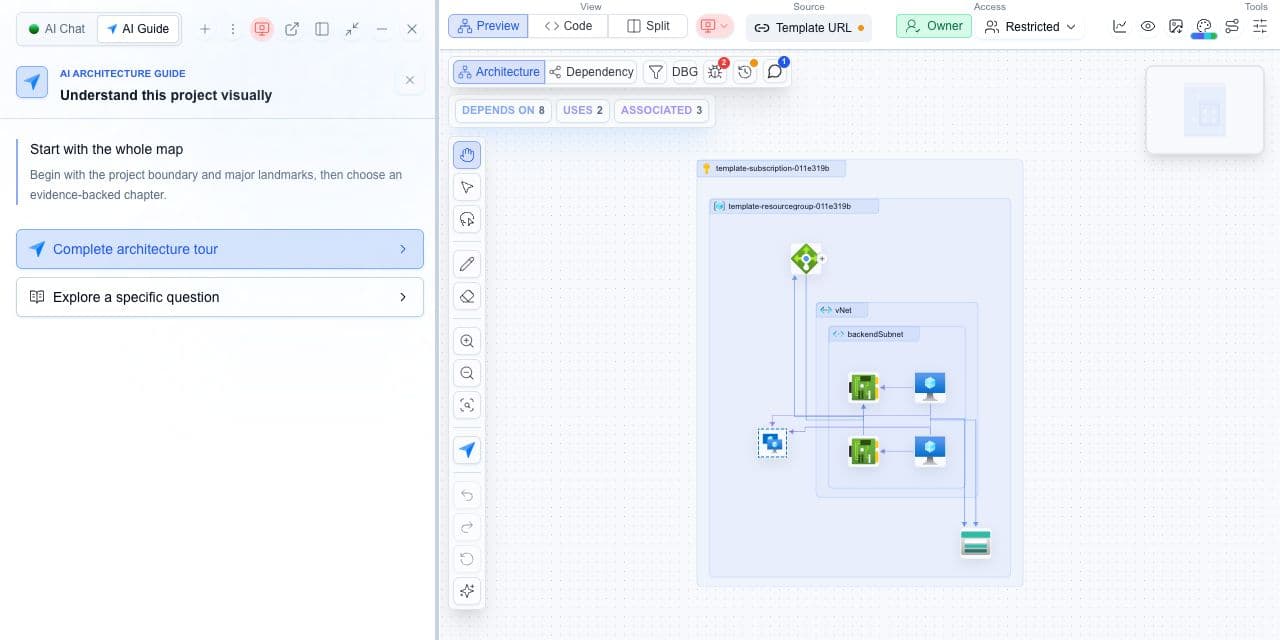
Decision guide
| Check | Cloudeval path | Note |
|---|---|---|
| Agent access | Configured MCP tools. | The agent only sees what credentials allow. |
| Best first test | Ask for docs or one report summary. | Verify setup before using project data. |
| Security | Scoped credentials and least privilege. | Avoid broad credentials for automation. |
| Decision flow | Agent prepares; user reviews. | Do not auto-apply infrastructure changes from agent text. |
Agent-assisted report review
An engineer can ask an MCP-compatible agent to summarize top architecture risks from a Cloudeval project.
- The agent can retrieve report details and point back to the relevant project or report views.
- It gets a tool-access path instead of relying only on pasted screenshots or stale notes.
Terminal and agent workflow
- Cloudeval provides MCP setup paths for supported developer tools and agents.
The Cloudeval CLI can serve a stdio MCP workflow using this command where configured.
shellcloudeval mcp serve- Cloudeval also exposes hosted product-docs MCP setup through the public documentation flow.
How to trust the result
- Ask which resource, report, or diagram element supports the answer when it affects a decision.
- Check sync time and report confidence before sharing recommendations.
- Use narrow questions for specific resources, findings, or dependencies.
