What can I do with the Cloudeval CLI for cloud architecture?
Quick answer
Use the Cloudeval CLI to create projects, run diagnostics, open diagrams, run reports, ask project questions, and export diagrams from the terminal.
It can also serve MCP workflows for compatible agent tools.
Start here
Use this to
Run Cloudeval architecture workflows without relying only on the browser UI.
Best source to use
Check the CLI overview and command reference before scripting automation, then run one project command by hand.
What you need
- Cloudeval CLI installed.
- Cloudeval login or scoped access key.
- A project source or project ID.
What you get
- Project creation or inspection from the terminal.
- Reports, questions, sessions, or exports from CLI commands.
- MCP serving when agents need tool access.
Get started
- 1Install the Cloudeval CLI from the public install flow.
- 2Run setup, login, status, and doctor commands before relying on automation.
- 3Create or inspect Cloudeval Azure projects from the terminal.
- 4Run reports or ask project questions with project IDs.
- 5Export architecture or dependency diagrams when a headless workflow needs image files.
- 6Configure MCP serving when an agent needs tool access through the CLI.
When this works best
Use this when you want terminal automation for projects, reports, questions, exports, and MCP.
Provider import behavior still depends on current Cloudeval support.
Turn a diagram into a guided investigation
When a written answer is not enough, AI Guide walks through the architecture or dependency view, highlights the resources under discussion, and keeps the explanation, evidence, and next check together.
Personas adjust the emphasis for executive, architecture, security, or operations reviews. They do not change the available project evidence.
See how AI Guide works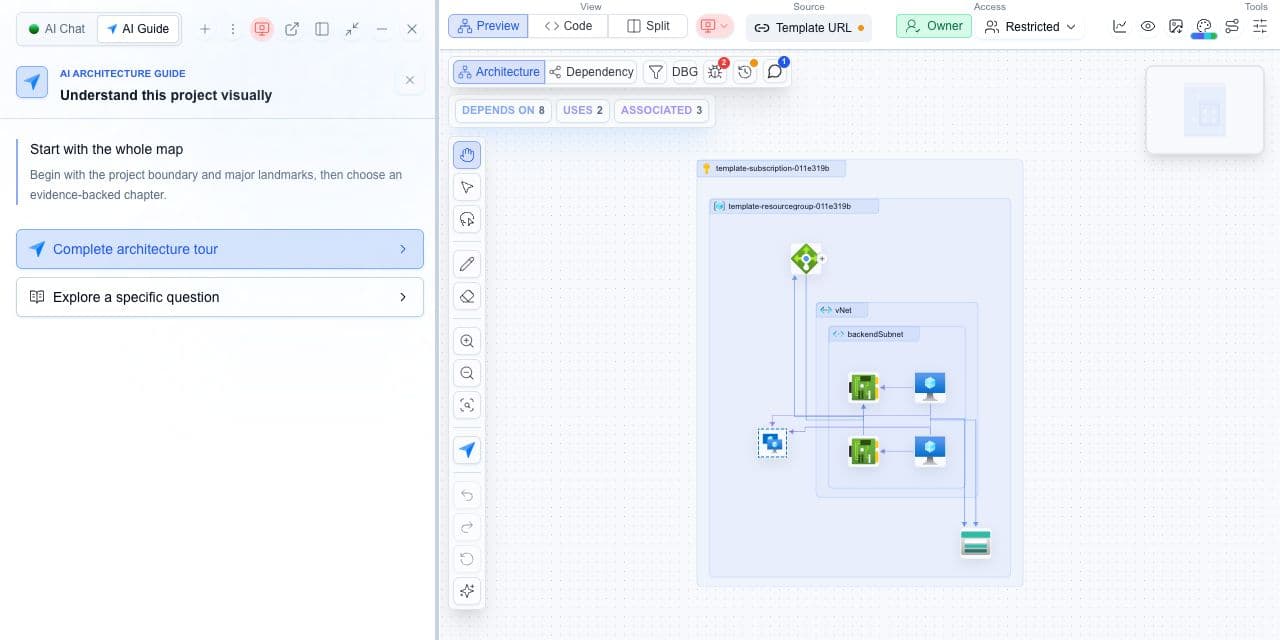
Decision guide
| Check | Cloudeval path | Note |
|---|---|---|
| Setup | Install, login, run doctor/status. | Do this before automation. |
| Project work | Create, open, inspect, or link a project. | Use project IDs for repeatable workflows. |
| Reports and AI | Run reports and ask project questions. | Prefer specific prompts. |
| Exports and agents | Export diagrams or serve MCP. | Use scoped credentials in CI. |
Terminal-first architecture review
A developer can create a Cloudeval project from ARM JSON, run reports, open the project diagram, export an architecture image, and ask a project question from the terminal.
This avoids clicking through every app surface for repeated work.
Terminal and agent workflow
This command creates Cloudeval projects from supported sources.
shellcloudeval projects createThis command runs report workflows for a project.
shellcloudeval reports runThis command sends one-shot project questions.
shellcloudeval askThis command exports architecture or dependency diagram images.
shellcloudeval projects export-diagramThis command supports stdio MCP workflows where configured.
shellcloudeval mcp serve
How to trust the result
- Run one command manually before putting it into CI or an agent workflow.
- Keep project IDs, account details, IPs, and resource names out of public exports unless they are sanitized.
- Link exported diagrams back to the Cloudeval project or report when reviewers need details.
Frequently asked questions
cloudeval ask supports project questions against available Cloudeval project context.