How do I generate architecture diagrams in GitHub Actions?
Quick answer
Use the Cloudeval GitHub Action to create a project review from supported infrastructure source, export diagrams and reports, and post the result to a pull request.
Configure scoped access and gates; a green workflow alone is not proof that an evaluation ran.
Start here
Use this to
Move architecture review into the pull request with repeatable inputs, findings and exports.
Best source to use
Check the CLI overview and command reference before scripting automation, then run one project command by hand.
What you need
- Cloudeval CLI installed.
- Cloudeval login or scoped access key.
- A project source or project ID.
What you get
- Project creation or inspection from the terminal.
- Reports, questions, sessions, or exports from CLI commands.
- MCP serving when agents need tool access.
Get started
- 1Install the Cloudeval CLI from the public install flow.
- 2Run setup, login, status, and doctor commands before relying on automation.
- 3Create or inspect Cloudeval Azure projects from the terminal.
- 4Run reports or ask project questions with project IDs.
- 5Export architecture or dependency diagrams when a headless workflow needs image files.
- 6Configure MCP serving when an agent needs tool access through the CLI.
- 7Define the source root and entry template in .cloudeval/config.yaml.
- 8Run the action with a scoped access key and project ID.
- 9Review the PR comment, optional Check Run or SARIF output, and artifacts.
- 10Keep skipped checks and unsupported areas visible as not assessed.
- 11Keep the source revision, gate result and exported artifact together; PR diagram diffs are not part of this workflow.
When this works best
The GitHub workflow reviews supported Azure inputs and AWS CloudFormation in static beta.
PR diagram diffs and native repository scanning are not claimed as current capabilities.
Turn a diagram into a guided investigation
When a written answer is not enough, AI Guide walks through the architecture or dependency view, highlights the resources under discussion, and keeps the explanation, evidence, and next check together.
Personas adjust the emphasis for executive, architecture, security, or operations reviews. They do not change the available project evidence.
See how AI Guide works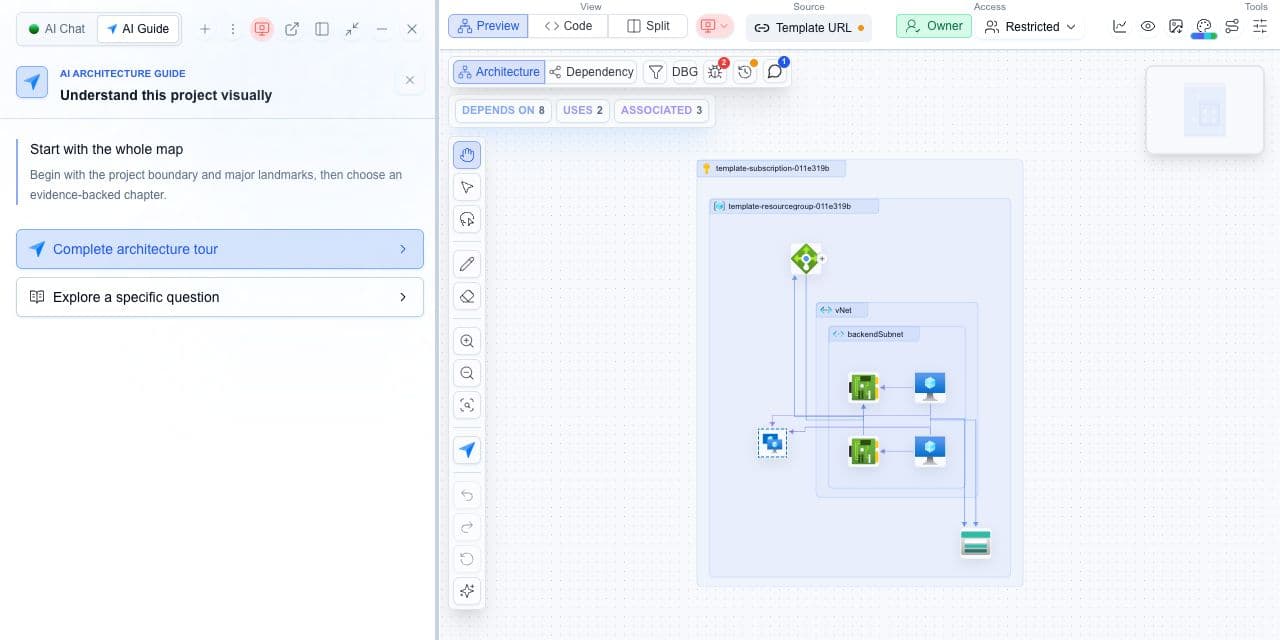
Decision guide
| Check | Cloudeval path | Note |
|---|---|---|
| Setup | Install, login, run doctor/status. | Do this before automation. |
| Project work | Create, open, inspect, or link a project. | Use project IDs for repeatable workflows. |
| Reports and AI | Run reports and ask project questions. | Prefer specific prompts. |
| Exports and agents | Export diagrams or serve MCP. | Use scoped credentials in CI. |
Put the architecture review in the pull request
Keep the source root and entry template in .cloudeval/config.yaml, run the Cloudeval Action with a scoped access key and project ID, then inspect the PR comment, gate result and downloaded artifacts.
Terminal and agent workflow
This command creates Cloudeval projects from supported sources.
shellcloudeval projects createThis command runs report workflows for a project.
shellcloudeval reports runThis command sends one-shot project questions.
shellcloudeval askThis command exports architecture or dependency diagram images.
shellcloudeval projects export-diagramThis command supports stdio MCP workflows where configured.
shellcloudeval mcp serve
How to trust the result
- Run one command manually before putting it into CI or an agent workflow.
- Keep project IDs, account details, IPs, and resource names out of public exports unless they are sanitized.
- Link exported diagrams back to the Cloudeval project or report when reviewers need details.
Frequently asked questions
cloudeval ask supports project questions against available Cloudeval project context.