What is an AI cloud architecture assistant?
Quick answer
Cloudeval brings AI investigation into the same workspace as your architecture diagrams, source files and reports.
- Ask questions about a resource, follow its dependencies and inspect the evidence available in your project.
- Web, CLI and MCP workflows let you carry that context into your existing tools.
Start here
Use this to
Use AI to review architecture without losing source context or evidence.
Best source to use
Give the assistant a Cloudeval project, report, diagram, or docs page so the answer can reference real context.
What you need
- A Cloudeval project or docs context the assistant can use.
- Reports or diagrams for questions that need evidence.
- Scoped credentials for automation or agent access.
What you get
- Project-aware architecture answers.
- Source-aware recommendations.
- Agent or CLI workflows for repeated review tasks.
Get started
- 1Connect Cloudeval to a project source such as ARM/Bicep output or live Azure sync.
- 2Use diagrams and reports to establish a project baseline.
- 3Ask focused questions about risks, dependencies, costs, and remediation options.
- 4Let agents use MCP tools where configured to retrieve Cloudeval project and report context.
- 5Use CLI workflows for repeatable project, report, export, and ask commands.
- 6Review evidence and freshness before making architecture decisions.
Helpful docs
When this works best
Use this when you want AI answers tied to Cloudeval projects, reports, diagrams, CLI workflows, or MCP access rather than a generic chatbot response.
Turn a diagram into a guided investigation
When a written answer is not enough, AI Guide walks through the architecture or dependency view, highlights the resources under discussion, and keeps the explanation, evidence, and next check together.
Personas adjust the emphasis for executive, architecture, security, or operations reviews. They do not change the available project evidence.
See how AI Guide works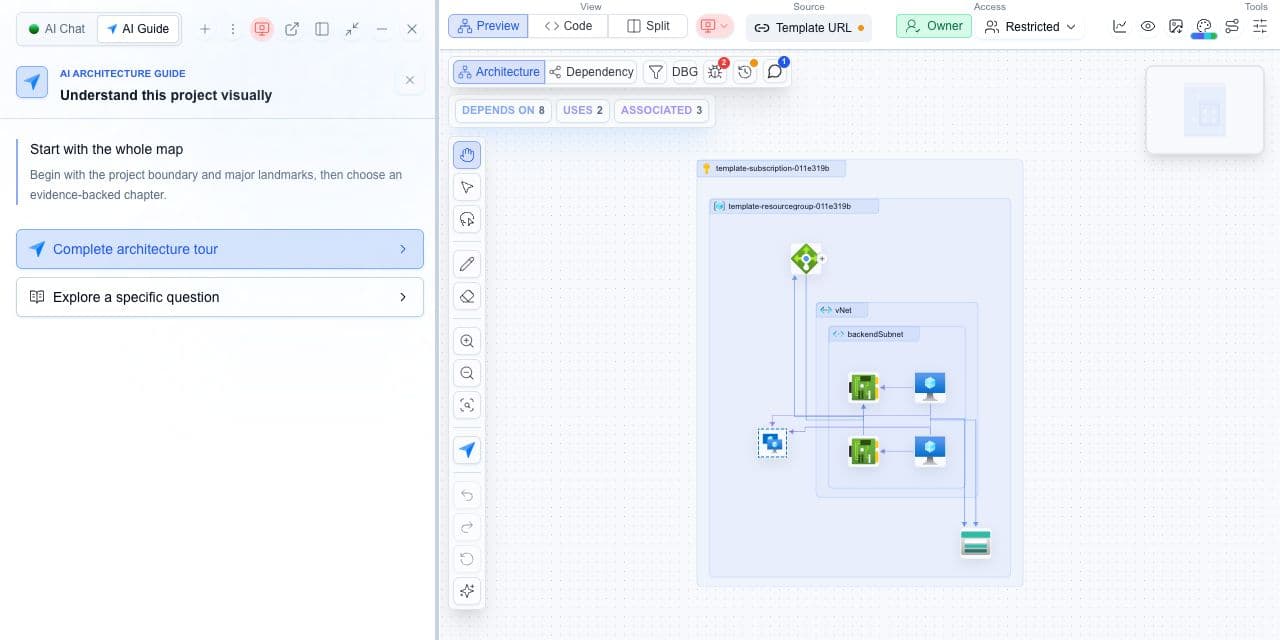
Decision guide
| Check | Cloudeval path | Note |
|---|---|---|
| Context | Project, diagram, report, docs, CLI, and MCP context. | Better context means better answers. |
| Best question | Ask what changed, what is risky, or what evidence supports a finding. | Avoid vague “is this good?” prompts. |
| Automation | Use CLI or MCP for repeatable tasks. | Use scoped access keys. |
| Human review | Reviewers still validate important decisions. | AI helps prepare the review; it does not own it. |
Assistant for architecture review
A platform team can ask which resources are exposed, which findings need review, which report supports a recommendation, and how to export the current diagram for review.
Cloudeval is useful when AI answers and project context stay connected.
Terminal and agent workflow
- Cloudeval CLI supports setup, diagnostics, projects, reports, sessions, MCP, billing, and frontend deeplinks.
- Cloudeval MCP tools let compatible agents query product documentation and project/report context depending on configuration.
- Scoped access keys are preferred for CI and agent automation.
How to trust the result
- Ask which resource, report, or diagram element supports the answer when it affects a decision.
- Check sync time and report confidence before sharing recommendations.
- Use narrow questions for specific resources, findings, or dependencies.
