Updated May 12, 2026
How can I chat with my Azure architecture?
Quick answer
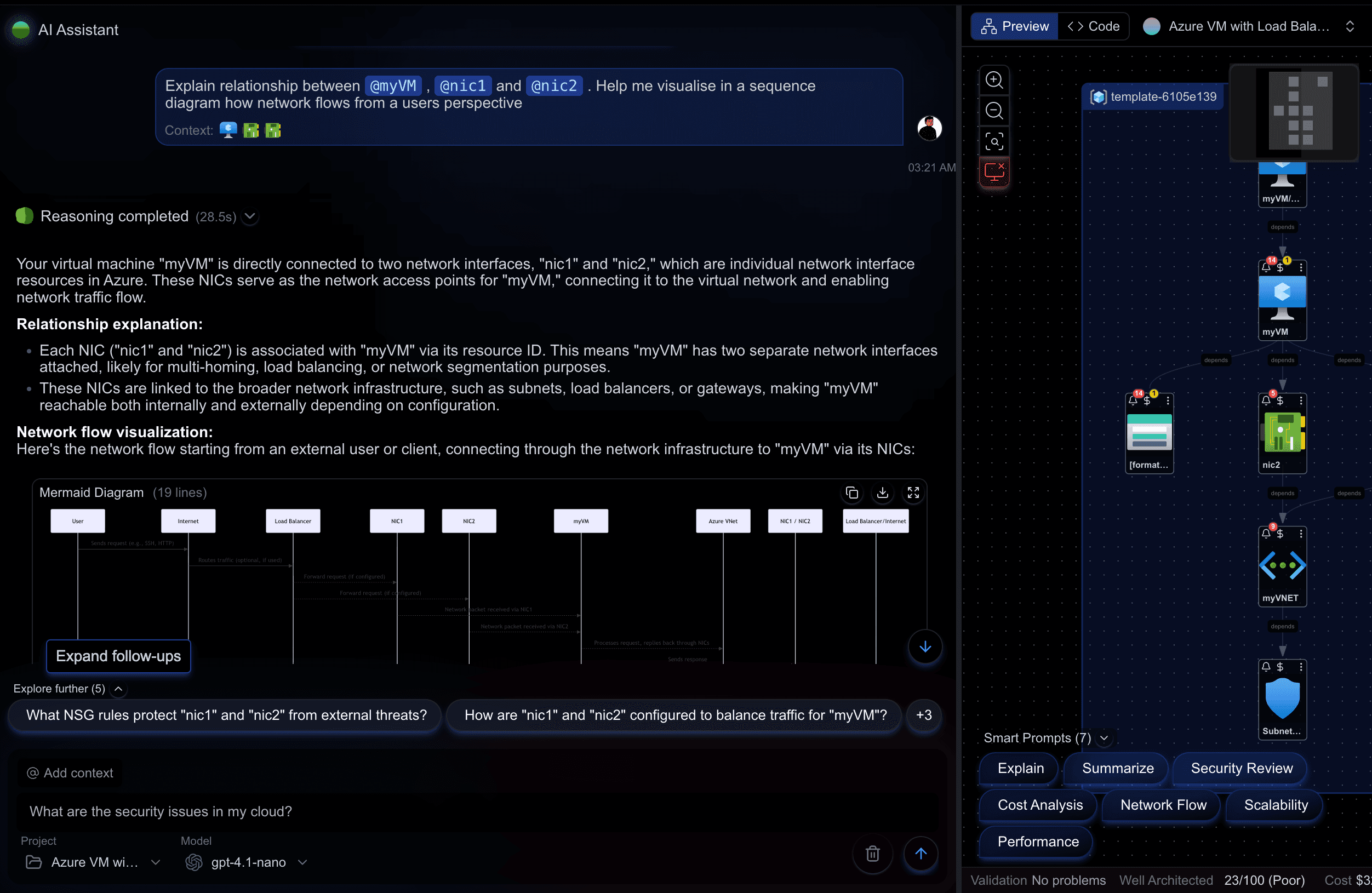
Open a Cloudeval project and ask questions against its diagrams, resources, reports, and source details.
The answer can use project context instead of giving generic cloud advice.
What you can expect
A practical path from source input to diagram, report context, docs, exports, and the first AI question to ask.
Start here
Use this to
Ask architecture questions that are based on your Cloudeval project.
Best source to use
Ask one specific question about a resource, report, dependency, exposure path, or cost concern.
What you need
- A Cloudeval project with imported or synced Azure context.
- At least one diagram, report, or resource graph to ground the answer.
- A specific question, not a broad prompt.
What you get
- An answer tied to project context.
- Evidence, citations, or report references where available.
- A next step when evidence is missing.
Fastest path to a useful result
- 1Open a Cloudeval project.
- 2Run or review a report.
- 3Ask one focused question about a resource, risk, dependency, or cost.
- 4Check the evidence before sharing the answer.

When this works best
Works best after a project has an imported diagram, report, or live Azure sync.
If data is missing, ask what context is unavailable before acting.
Decision guide
| Check | Cloudeval path | Note |
|---|---|---|
| Question style | Ask about one project, report, resource, or risk. | Specific questions produce clearer answers. |
| Grounding | Project graph, reports, docs, and evidence. | Cloudeval should say when evidence is missing. |
| Output | Answer plus next step. | Use reports for decisions that need source support. |
| Sharing | Export or share reviewed findings. | Do not expose private resource details unintentionally. |
Who this is for
- Cloud architects
- SREs
- DevOps engineers
- Security reviewers
- Engineering managers
How it works
- 1Create or open a Cloudeval Azure project.
- 2Make sure the project has diagram, file, sync, or report context available.
- 3Ask a specific architecture question such as what changed, what is risky, or what depends on a resource.
- 4Review citations, evidence, or graph insight cards where available.
- 5Run missing reports when Cloudeval says evidence is incomplete.
- 6Export or share findings when the answer needs stakeholder review.
Architecture Q&A over a live project
Instead of asking a generic model whether an architecture is secure, ask Cloudeval which project resources expose public entrypoints.
- Then ask which report shows the finding and which details are stale or missing.
- The answer should reflect the project state rather than a generic best-practice checklist.
Terminal and agent workflow
Use this command for one-shot project questions.
shellcloudeval ask "Summarize this project's top architecture risks" --project <project-id>- MCP-compatible agents can query Cloudeval context from supported clients.
- CLI sessions can preserve useful local history for automation and investigation workflows.
How to trust the result
- Ask which resource, report, or diagram element supports the answer when it affects a decision.
- Check sync time and report confidence before sharing recommendations.
- Use narrow questions for specific resources, findings, or dependencies.
FAQ
What does Cloudeval use to answer architecture questions?
Answers can use project metadata, connection metadata, template content, diagram/resource graph data, reports, report history, pricing information, docs, and chat history where available.
Will Cloudeval answer if evidence is missing?
It should identify missing evidence and suggest a concrete next step, such as running a report or refreshing project context.
Can I ask from the terminal?
Yes.
The Cloudeval CLI includes ask and session workflows for terminal and automation use.
Related pages
Build this workflow in Cloudeval
Start with a Cloudeval Azure project, then connect diagrams, reports, source links, CLI automation, and MCP-compatible agent workflows around the same source of truth.
